About Tincan
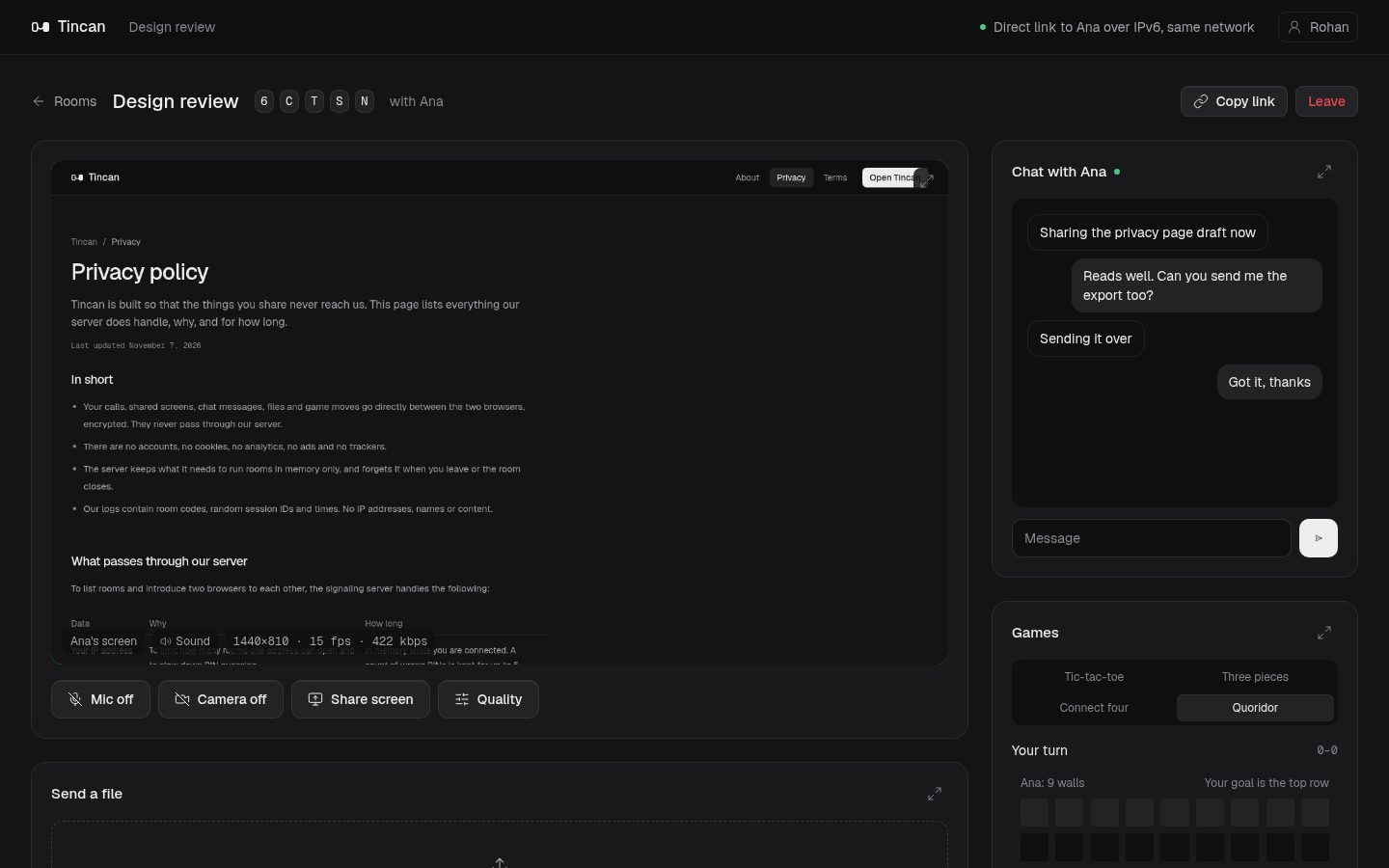
Tincan gives two people a private room in the browser: a video call, screen sharing with sound, chat, file transfer and a few games, all on one direct connection between your two devices.
Last updated
Why the name
Remember the tin can telephone? Two cans, one string, and a voice that travels from one end to the other with nothing in between. Tincan works the same way. Once the two of you are connected, your call, your screen, your messages and your files go straight from one browser to the other.
What you can do in a room
- Video and voice calls at 360p, 720p or 1080p, with a live readout of resolution, frame rate and bitrate.
- Screen sharing with sound. Share a tab, a window or the whole screen. A sharp text mode keeps documents crisp and a smooth motion mode keeps video fluid.
- Chat that lives only in the two open tabs.
- File transfer of any size, with a live map of every piece as it arrives. Interrupted transfers resume.
- Games: Tic-tac-toe, Three pieces, Connect four and Quoridor.
- An expand button on each part of the room, so you can focus on one thing while the other person is told what you opened.
How the connection works
Browsers can't find each other on their own, so Tincan has a small server that does three things and nothing more:
- Keeps the list of rooms. It knows each room's name, code, whether it has a PIN and how many people are in it.
- Introduces the two browsers. It passes a few setup messages (WebRTC offers, answers and network candidates) from one person to the other.
- Tells each browser its public address. A STUN responder on the same server answers over both IPv4 and IPv6, so browsers can find a direct path, and IPv6 is preferred when both sides have it.
After that, the browsers open a WebRTC connection to each other. There is deliberately no relay (TURN) server. If two networks can't reach each other directly, the room says so instead of quietly routing your call through someone else's machine. Most home and mobile networks connect fine; some strict office networks don't.
How files travel
Files are cut into 32 KB pieces and grouped into 512 KB blocks. For every 16 pieces of data, Tincan adds 4 pieces of parity using Cauchy Reed-Solomon coding. Any 16 of the 20 pieces rebuild the block, so a few lost packets cost nothing and the transfer doesn't stall waiting for resends. Pieces flow over three parallel channels, and anything still missing at the end is requested again.
Every block also carries a SHA-256 fingerprint, and the file's identity is the fingerprint of all of them together. The receiving browser checks each block and keeps it on the device as it arrives. If the connection drops, the transfer continues when you reconnect. If you send the same file again later, in any room, the two browsers compare notes and only the missing blocks travel.
Encryption
WebRTC encrypts every connection: media with SRTP and data with DTLS, using keys the two browsers agree on between themselves. The server never holds those keys and never sees your call, your screen, your messages or your files. As with any browser-based calling service, you rely on the server to pass the setup messages along unchanged. The code is public so anyone can check what it does.
Open source
Tincan is open source. The signaling and STUN server is written in Go and the web app uses Astro, React and Tailwind CSS, served from Cloudflare. Read the code, report a problem or suggest a feature on GitHub.
Good to know
- A room holds two people. A third visitor sees it as full.
- Rooms appear in a public list on the home page. Add a PIN to keep a room to people you invite.
- Empty rooms close after 10 minutes.
- Nothing is saved. When you leave or close the tab, the call, chat and game are gone.
Read the privacy policy for exactly what the server handles, and the terms of use.